
Pinterest Video Downloader: Save Pinterest Videos, Images and GIFs Free
Pinterest hides a lot of great video content, but the platform never gives users a simple way to save it. That gap is exactly what a reliable Pinterest Video Downloader solves. Instead of hunting for browser extensions or sketchy apps, this free online tool lets anyone grab a public Pinterest clip in just a few clicks. There’s no account to create and no software to install, which makes the whole process feel almost instant. Paste a link, preview the clip, choose a quality, and the file is yours.
How This Pinterest Video Downloader Works
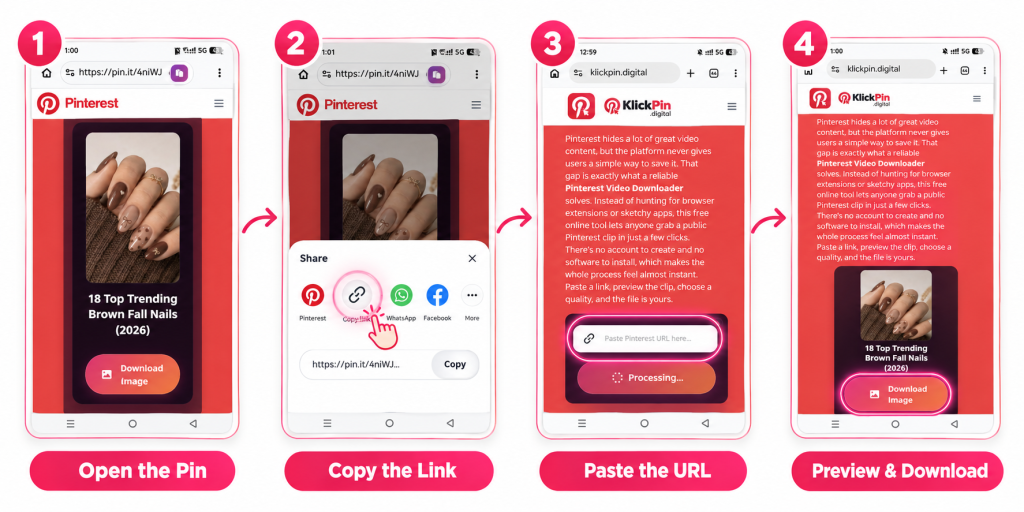
Using this Pinterest downloader is simple. Just follow these steps:
- Open the Pin you like on Pinterest.
- Tap the share icon and choose copy link.
- This gives you the exact Pinterest URL for that video.
- Come back to this page and paste the link into the box above.
- The tool reads the Pin right away and shows you a preview before download, so you can check it is the correct clip.
Once you see the preview, pick your video quality and press the download button. Here’s what happens next:
- The file saves straight to your device.
- On a phone, it usually lands in your camera roll or downloads folder.
- On a computer, it goes into your default downloads folder or files app.
- There is no sign-up step anywhere.
This makes it a true Pinterest downloader without registration, and a full Pinterest downloader without account as well.
Why Use a Free Online Pinterest Downloader
Cost is often the first worry people have with download tools. This one stays a free Pinterest downloader for every user, with no hidden charge later. It also works as a Pinterest downloader for Android, a Pinterest downloader for iPhone and iPad, and a Pinterest downloader for desktop, PC, or tablet. One browser-based tool covers every screen you own, so there is nothing extra to install and manage.
Speed matters too. Most Pins finish processing in a few seconds, even on a slower mobile connection. Files download without a watermark stamped over the video, so what you save is what you saw on Pinterest. Nothing you paste gets stored or linked back to your Pinterest account, which keeps the whole process private from start to finish.
Download Pinterest Videos, Images, GIFs and More
This tool goes beyond plain video clips. It also works as a Pinterest image downloader and a Pinterest GIF downloader, so you can save Pinterest photos or animated Pins with the same simple steps. Think of it as one complete Pinterest media downloader, or a general Pinterest pin downloader, built to handle almost anything a Pin can contain, including Idea Pins and multi-image Carousel Pins.
It also reaches further than single Pins. Support for a Pinterest board downloader and a Pinterest profile downloader means you can pull content from a whole board or profile page, not just one link at a time. There is even a Pinterest multiple pin downloader mode for saving several Pins together, along with support for saving Pinterest stories as a proper Pinterest story downloader when that content is public.
HD Quality, 4K Video and MP4 Format Options
Quality choice matters when you are saving a video for later. This works as an HD Pinterest video downloader, with options that stretch from standard HD up to a 1080p Pinterest downloader setting, and further still to 2K and 4K Pinterest downloader quality when the original Pin supports it. You always get the best available quality that Pinterest has stored, in full original resolution rather than a compressed copy.
Format-wise, video saves as a standard Pinterest MP4 downloader file, so it plays anywhere without extra software. The Pinterest to MP4 conversion keeps picture and sound together, while a separate audio-only path handles Pinterest to MP3 for anyone who only wants the sound. Images save as JPG format at high resolution, keeping every photo close to source quality.
Is This Pinterest Downloader Safe and Legal to Use?
Safety here is straightforward. This stays a browser-based Pinterest downloader, so nothing installs on your phone or computer. Your Pinterest password is never asked for and never needed, since the tool only reads the public link you paste. That single detail keeps your main account fully separate from anything you download.
Legally, it depends on how you use the file afterward. Saving a video for personal viewing, or keeping a copy of your own uploaded Pin, causes no issue. Reposting someone else’s video as your own work, or using it for a business without asking first, can create copyright problems no matter which tool made the download. When a Pin belongs to another creator, a simple credit or a quick message asking permission goes a long way.
Using This Downloader on Android, iPhone, iPad, PC and Tablet
On a phone, the steps stay nearly identical across systems. Open the Pinterest app on Android or iOS, tap share, and copy the video URL. Paste that link into your mobile browser on this page, then download and save straight to your camera roll. No separate app or APK file is needed at any point in that process.
On a larger screen, the same idea applies. Copy the Pinterest URL from your desktop browser’s address bar, paste it here, and choose a save location on your PC or tablet. Files typically land in your downloads folder, ready to move into any folder you prefer afterward. Whether you are on a phone, a tablet, or a full desktop browser, the download flow never really changes.